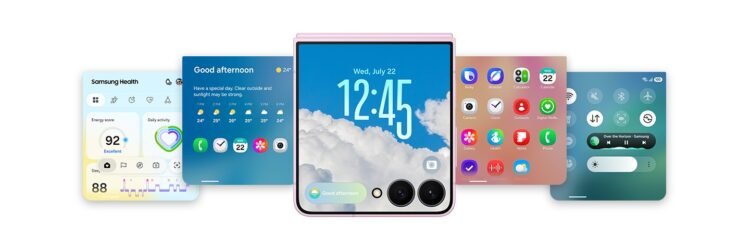



Digimagaz.com – Samsung is positioning One UI 9 as more than a visual update for Galaxy devices. The new software focuses on making everyday interactions more intuitive while expanding the role of artificial intelligence, improving multitasking and giving users greater visibility into how their personal information is handled.
The update is particularly tailored to Samsung’s latest foldable experience, with features designed around flexible displays, cover screens and multi-window workflows. At the same time, several of the changes are aimed at Galaxy users more broadly, including new AI-powered tools for productivity, photography and privacy.
One UI 9 Puts AI Closer to Everyday Tasks
One of the biggest changes in One UI 9 is the way Samsung wants AI to fit into normal smartphone routines rather than remain a separate collection of features.
The new Now Nudge feature is designed to suggest useful next actions based on what users are doing. Instead of requiring users to manually leave one application and open another, the system can provide prompts that help move a task forward.
For example, users can transition between activities such as checking their calendar, creating a schedule or saving a location to a map without having to repeatedly manage different apps themselves.
The approach reflects a broader shift toward contextual assistance. Rather than simply answering questions, Galaxy AI is being positioned as a tool that can help users complete tasks with fewer interruptions.
Now Brief Becomes More Personalized
Samsung is also expanding Now Brief, its personalized information feature.
With One UI 9, users can customize the types of briefings they want to receive according to their interests. The system is designed to learn from routines while also allowing users more control over the information presented to them.
The addition of action buttons makes the feature more practical. Instead of simply displaying information, Now Brief can provide shortcuts to actions such as opening a music application or navigating to an event stored in the calendar.
This turns the briefing experience into more of a starting point for daily tasks rather than a passive information panel.
My FanCam Brings More Control to Event Videos
One UI 9 also introduces a useful photography and video feature called My FanCam.
The idea is straightforward: users can record a wider shot of an event and later select an individual person to emphasize in the finished footage.
My FanCam can transform wide-angle recordings into subject-focused tracking shots. Users can also select an aspect ratio during editing, giving them more flexibility when preparing videos for different formats.
The feature could be particularly useful when recording group events where it is difficult to predict which person or moment will matter most while filming.
Instead of forcing users to choose a single subject before recording, the editing process provides more control afterward.
Photo Assist Makes AI Editing More Natural
Samsung is also expanding AI-powered image editing through Photo Assist.
Rather than relying entirely on traditional editing controls, users can describe the changes they want using natural language. The system then applies the requested edits to the image.
One UI 9 also makes comparison easier by displaying the original and edited versions side by side.
This approach could make advanced editing more accessible to people who do not want to spend time learning complicated photo-editing tools. The emphasis is on describing the desired result instead of manually adjusting numerous individual settings.
Foldable Design Gets Deeper Software Support
Samsung’s One UI 9 changes are especially significant for the Galaxy Z Fold8 experience.
The company says the software has been designed to adapt more naturally to different screen configurations. The interface can adjust to how content is being viewed, including portrait and landscape orientations on the larger main display.
That matters because foldable phones introduce a different challenge from conventional smartphones. Applications and interfaces need to remain usable when users move between a compact cover display and a larger internal screen.
Samsung is addressing this with what it describes as a more seamless screen experience, particularly for activities such as watching videos and reading longer content.
Smarter Wallpaper Placement on the Lock Screen
One UI 9 also introduces a small but practical improvement to wallpaper setup.
When users choose a Lock screen image, the software can automatically position the picture so important visual elements do not interfere with the clock or other widgets.
Users can also reposition the image, while the system can naturally fill the upper portion to maintain a balanced appearance.
It is not a headline feature, but it illustrates Samsung’s broader focus on reducing the amount of manual adjustment required during device customization.
Multitasking Gets More Flexible on Foldables
Multitasking remains one of the strongest reasons to choose a large foldable display, and One UI 9 puts additional emphasis on that experience.
The updated multi-window system supports two-way and three-way split views, allowing users to run several applications alongside one another and move between them with fewer interruptions.
On a large Galaxy Z Fold8 display, this can allow activities that would normally require constant app switching to happen simultaneously.
For example, users could keep reference material open while working in another application, or use Samsung Notes alongside visual content when researching or organizing information.
The larger screen therefore becomes more than a bigger version of a smartphone display. The software is designed to make the additional screen space useful for actual workflows.
FlexWindow Becomes More Capable
Samsung is also improving how users interact with the cover display, or FlexWindow.
One UI 9 allows users to access an apps tray by swiping upward from the bottom and open notifications or the Quick Panel by swiping down from the top.
Widgets can also be added, removed and repositioned directly from the cover screen.
The goal is to make the smaller display feel less like a temporary interface that users must abandon whenever they want to accomplish something and more like a useful part of the overall Galaxy experience.
Samsung Adds More Transparency Around AI Activity
As AI becomes more deeply integrated into smartphones, privacy and transparency are becoming increasingly important.
One UI 9 addresses this with AI Assistant Activity, which gives users a clearer view of actions performed by AI assistants.
Users can see which applications were accessed, what actions were performed and when those activities occurred.
This provides a useful layer of visibility because AI-powered assistants can potentially interact with multiple applications. Instead of leaving those interactions hidden in the background, Samsung is giving users a centralized way to review them.
AI Privacy Alerts Monitor Suspicious App Behavior
Samsung is also introducing AI Privacy Alerts, which uses AI to identify potentially concerning application behavior.
The system can warn users when applications appear to be accessing precise location information unnecessarily or attempting to use background permissions in ways that could represent a security concern.
It can also monitor how personal information is being used and recommend reducing the amount of sensitive data available to applications.
For users who do not regularly inspect application permissions, this could provide an additional layer of awareness without requiring them to manually investigate every application.
Samsung Browser Adds Protection Against Malicious Websites
One UI 9 also expands security protection when browsing the web.
Samsung says its browser can use a machine-learning model to identify potentially malicious websites and display a warning before a user proceeds.
The feature is designed for situations where someone accidentally taps a suspicious link or reaches a potentially dangerous webpage.
The important point is that the protection operates at the browsing stage, giving users an opportunity to reconsider before proceeding to a site that may pose a security risk.
Galaxy AI Data Can Be Processed On Device or in the Cloud
Samsung is also emphasizing greater control over how Galaxy AI processes personal information.
The company says users can determine whether supported Galaxy AI processing takes place on the device or in the cloud.
One UI 9 builds on Samsung’s broader security architecture, including its Personal Data Engine, Knox Vault and KEEP technologies.
According to Samsung, personal data handled through the Personal Data Engine is encrypted and stored on the device. The company also highlights Knox Matrix Trust Chain technology as a way to extend security across connected Galaxy devices.
The result is an approach that puts more emphasis on giving users visibility and control rather than treating AI processing as something that happens entirely in the background.
Support and Device Care Are Built Into the Experience
One UI 9 also brings device support tools closer to the user.
Samsung says Galaxy owners can check warranty information, receive assistance from Bixby, schedule service appointments with upfront cost estimates and run device diagnostics.
Users can also manage Samsung Care+ protection and request repairs directly from their devices.
These features are less glamorous than AI or foldable multitasking, but they could make ownership easier by putting common support functions in one location.
One UI 9 Is About More Than a Visual Redesign
The most notable aspect of One UI 9 is that Samsung appears to be treating the operating system as an active layer between the user and the device.
AI features such as Now Nudge and Now Brief aim to anticipate what users may want to do next. Photo Assist and My FanCam use AI to simplify creative tasks. Meanwhile, AI Assistant Activity and AI Privacy Alerts focus on making increasingly automated experiences more transparent.
For foldable devices, the emphasis is equally practical. Better multi-window support, improved FlexWindow controls and screen-aware interfaces are intended to make the additional hardware capabilities easier to use.
Taken together, the changes suggest that Samsung’s strategy for One UI 9 is not simply about adding more features. It is about reducing the number of steps users need to take to accomplish everyday tasks while giving them more control over AI and personal data.
For Galaxy users, that could ultimately be the more meaningful upgrade: an interface that feels less like a collection of separate functions and more like a system designed around how people actually use their devices.
Read More : iPhone 18 Pro and iPhone Ultra Release Date, What Apple’s September 2026 Schedule Could Look Like